Salesforce Integration Best Practices: What Actually Works
Introduction
Salesforce integrations always look tidy in planning sessions A few systems.
Some arrows on a slide. Someone confidently saying, “This should be straightforward.” And for a while, it is. The integration passes testing. Demos go well. Stakeholders sign off. Everyone moves on.
Then real usage begins.
A few weeks later, small cracks start to show. Records that didn’t sync. API limits getting hit at the worst possible time. Duplicate data that no one can quite explain. Nothing catastrophic — just enough friction to make teams quietly lose confidence.
Here’s the pattern we’ve seen more times than we’d like to admit:
When Salesforce integrations struggle, it’s rarely because Salesforce can’t handle the load. It’s because the integration was designed for a diagram, not for reality.
This blog walks through Salesforce integration best practices that actually survive real projects — changing data volumes, partial failures, evolving requirements, and long-term ownership. Less theory. More things learned the hard way.
1. Start With the Reason, Not the Technology
Before anyone debates REST APIs versus Platform Events, pause.
Why does this integration exist in the first place? Does the business genuinely need real-time data, or does it just sound important? Which system owns the data when things disagree? What’s supposed to happen when one side is temporarily unavailable?
We’ve learned — usually after the fact — that skipping these questions early creates fragile integrations by design. Teams then spend months compensating with retries, manual fixes, and workarounds that were never planned.
What tends to work better is surprisingly simple: clarify intent first.
Once the purpose, ownership, and tolerance for delay are clear, the technical choices stop being emotional. They become obvious.
2. Choose an Integration Pattern That Matches Reality
Salesforce supports multiple integration patterns for a reason. Each exists to solve a different problem.
Common ones include:
- Synchronous REST calls for immediate feedback
- Scheduled or batch jobs for large data volumes
- Event-driven approaches using Platform Events or Change Data Capture
- Middleware-based integrations for orchestration and transformation
Real-time integrations are appealing. They also happen to be the most fragile. Latency, retries, limits, and downstream failures compound quickly.
We’ve seen teams insist on real-time only to later ask, “Why does this break during peak hours?”
A healthier rule of thumb:
Use real-time only when the business truly needs instant confirmation. For everything else, asynchronous or event-driven patterns age far more gracefully.
3. Centralise Authentication Before It Becomes a Problem
Despite how well known this is, credentials still end up hardcoded more often than they should.
Salesforce’s Named Credentials exist to prevent exactly that. They centralise authentication, reduce deployment risk, and keep logic readable.
Teams benefit because:
- Credentials can rotate without code changes
- Environments behave consistently
- Apex and Flow logic stays understandable
This isn’t just security hygiene. It’s operational sanity.
A rule worth enforcing:
If an outbound integration doesn’t use a Named Credential, it’s already carrying unnecessary risk.

4. Don’t Default to Code When Declarative Will Do
Not every integration needs Apex.
With HTTP Callouts available in Flow, many use cases can be handled declaratively — especially when logic is straightforward and volumes are manageable.
Declarative integrations work well when:
- Business rules change often
- Admins need visibility
- Deployment complexity should stay low
Apex absolutely has its place. But starting declarative-first keeps integrations more adaptable over time. Honestly, this often depends on team maturity — and there’s nothing wrong with acknowledging that.

5. Design for Confidence, Not Just Data Movement
A good integration doesn’t constantly ask users to verify its work.
- Records appear when they should.
- Fields are populated correctly.
- Ownership and timestamps make sense.
That quiet reliability isn’t accidental.
What we always look for inside Salesforce:
- Records created or updated automatically
- Clear, meaningful status values
- Ownership assigned intentionally
- Timestamps aligned with real business events
We’ve seen the moment trust returns — it’s when users stop opening records “just to check.”

6. Assume Scale Will Happen (Even If It Hasn’t Yet)
Salesforce governor limits don’t care about intent. They care about execution.
Common failure patterns show up when integrations:
- Make one callout per record
- Perform synchronous callouts inside loops
- Trigger logic without volume controls
These designs often work at first. Then data grows.
What holds up long-term is designing for bulk from day one. Queueable and Batch Apex aren’t optimisations at scale — they’re requirements.
If an integration can’t grow from dozens of records to thousands without redesign, it’s already on borrowed time.
7. Security Isn’t a Checkbox You Tick Once
We’ve noticed teams often relax once OAuth is in place.
There’s a sense of “Okay, authentication is done — we’re secure.” That’s usually where risk quietly starts.
Because exposure rarely comes from login failures. It comes from what the integration is allowed to see after it connects.
Field-level access, payload structure, scopes, IP rules — all of it matters. Especially when sensitive data is involved.
One project stands out. The integration worked. Authentication was solid. But no one had questioned whether the external system actually needed every field it was receiving.
It didn’t.
We caught it early. That saved a very uncomfortable conversation later.
What’s worked best for me is simple restraint:
Expose only what the external system genuinely needs — nothing more.

8. Pull Configuration Out of Code Before It Pulls You Down
Hardcoding values feels harmless at first.
An endpoint here. A threshold there. A default flag because “we’ll clean it up later.”
Later rarely comes.
Endpoints change. Retry logic evolves. A rule that once felt permanent suddenly isn’t. Now every adjustment means code changes, redeployments, and risk — for things that were never meant to be static.
We’ve seen integrations become brittle not because they were complex, but because they were rigid.
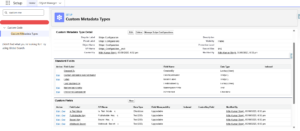
A more durable approach is storing configuration in Custom Metadata:
- Reference identifiers
- Feature toggles
- Behaviour flags
- Retry limits and thresholds
It’s a small architectural choice that pays off repeatedly — especially across environments and teams.
Conclusion
Salesforce integrations aren’t just about moving data.
They’re about trust.
The integrations that last are the ones that:
- adapt to change
- respect platform limits
- scale without constant rewrites
- remain understandable long after go-live
When integrations are built well, no one talks about them.
They don’t draw attention. They don’t need constant checking. They quietly move data where it needs to go, day after day.
In our experience, that quiet reliability is what teams remember long after the project ends — and it’s usually the difference between an integration that survives, and one that slowly becomes a liability.
If you’re reviewing existing integrations or planning a new one and want a second opinion grounded in real project experience, you can reach us at contact@thepinqclouds.com or visit www.thepinqclouds.com.